QR-Contest.com and QR-Answers.com
QR-Contest and QR-Answers (for enterprise customers) are survey-like applications that allow you to publish a question where the answers are marked with QR codes. Most QR code survey apps take you to a web page where you have to fill out a lengthy survey or set of forms. Those survey types lose 90% of thier participants in the first few questions.
QR-Contest and QR-Answers are different because the answer is the QR code. The voter only has to scan the code on their phone and click the displayed link. Done! That action alone registers the answer that they have chosen - no surveys, no extra stuff to fill out.
QR-Answers is for enterprise customers wishing to survey multiple projects and locations and is fully multi-user and collaborative. QR-Contest is more consumer focused to allow you to have a fun way for people to vote for their favorite chilli in a cookoff, artwork on a wall, whether they were naughty or nice, etc.
Quick Start
Here is a video with a brief walkthrough.
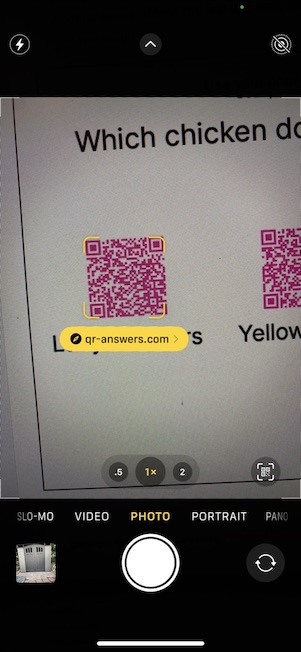
Here is a simple question (you can follow the Quick Start to see the full question) with a set of 3 answers. You can see the first answer is scanned and shows a highlighted link qr-answers.com >.
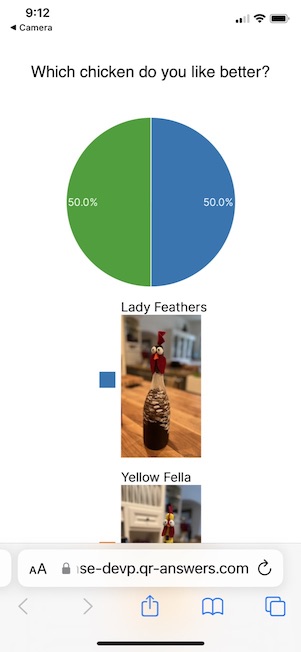
When you select the link, it will take you to a page that shows your response (Lady Feathers) and all the recorded responses in graphical format (there are lots of choices for this page). Done!
To get started go to the Quick Start
As the creator of the contest, you are able to log into https://app.qr-contest.com and view the results for the most recent Contests on the home page; see all the results under the Results bottom tab; or publish a Dashboard so anyone can see the results.